Spending six to eight hours a day at a home desk can quietly take a toll on your body. If you frequently finish your workday with stiff shoulders, a sore lower back, or tired eyes, your workspace layout—not your work ethic—is likely the culprit.
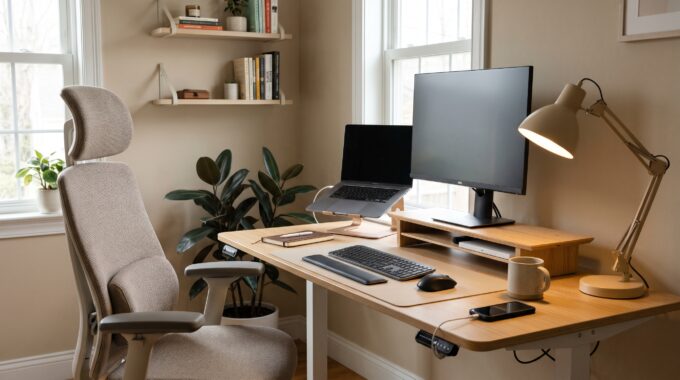
The good news is that creating an ergonomic home office does not mean filling your room with bulky, clinical-looking gear. With a few thoughtful adjustments to height, lighting, and posture, you can build a workspace that looks inviting and supports your body all day long.
Here are seven practical ergonomic desk setup tips to boost both your comfort and focus.
—
## 1. Position Your Screen at Eye Level
Looking down at a laptop screen for hours places significant strain on your neck and upper spine. Ideally, the top third of your monitor should sit directly at eye level when you are sitting upright.
* **Elevate Your Laptop or Monitor:** Use a sturdy monitor stand, a stack of hardcover books, or an adjustable laptop riser to bring your screen up to eye height.
* **Keep an Arm’s Length Distance:** Position your screen roughly 20 to 26 inches (about an arm’s length) away from your face so you never have to lean forward to read small text.
—
## 2. Pair a Laptop Riser with an External Keyboard and Mouse
Once you elevate your laptop screen to eye level, typing on its built-in keyboard becomes awkward for your wrists. Always pair a raised laptop with separate peripherals.
* **Keep Elbows at a 90-Degree Angle:** Place your external keyboard and mouse close enough that your upper arms rest comfortably at your sides, with your elbows bent at roughly 90 degrees.
* **Maintain Neutral Wrists:** Avoid bending your wrists upward or downward while typing. A slim keyboard and a low-profile wrist rest help keep your hands aligned naturally.
—
## 3. Adjust Your Chair Height So Your Feet Rest Flat
Proper lower-body support is the foundation of good sitting posture. When your feet dangle or tuck awkwardly beneath your chair, pressure builds up in your lower back and thighs.
* **Check Your Knee Angle:** Adjust your chair height until your thighs are parallel to the floor and your knees form a comfortable 90-degree angle.
* **Add a Footrest If Needed:** If your desk is fixed at a slightly higher height and raising your chair lifts your feet off the ground, place a supportive footrest—or even a firm cushion—underneath your desk.
—
## 4. Support the Natural Curve of Your Lower Back
Even the most stylish office chair can leave a gap behind your lumbar spine, causing you to slouch as the afternoon wears on.
* **Use Lumbar Support:** Sit all the way back in your chair so your lower back makes contact with the backrest. If your chair lacks built-in lumbar contouring, a compact memory foam lumbar pillow adds instant support without ruining your room’s aesthetic.
—
## 5. Layer Your Desk Lighting to Prevent Eye Strain

Working in a dim room—or sitting directly under harsh overhead glare—forces your eyes to work overtime, leading to afternoon headaches and fatigue.
* **Eliminate Screen Glare:** Position your desk perpendicular to windows rather than directly in front of or behind them.
* **Add a Warm Task Lamp:** Place an adjustable desk lamp with warm-to-neutral color temperature settings off to the side of your monitor to illuminate notebooks and documents evenly.
—
## 6. Keep Everyday Essentials Within the “Primary Reach Zone”
Constantly reaching across your desk for a water bottle, notebook, or phone causes subtle, repetitive twisting in your shoulders and upper back.
* **Organize by Frequency:** Keep items you touch every hour (mouse, notepad, pen, water tumbler) within a comfortable forearm’s reach. Move reference books, chargers, and infrequently used supplies toward the back corners or onto a shelf.
—
## 7. Follow the 20-20-20 Rule and Micro-Break Habit
Even the most ergonomically tuned setup cannot replace regular movement. The human body thrives on gentle posture changes throughout the day.
* **Rest Your Eyes:** Every 20 minutes, look away from your screen at an object at least 20 feet away for 20 seconds to relax your eye muscles.
* **Stand and Stretch Hourly:** Set a subtle hourly chime to stand up, roll your shoulders back, and walk around for two minutes before diving back into your next task.
—
### Final Thoughts
An ergonomic workspace is really about removing subtle daily friction so your energy goes into your work rather than fighting physical discomfort. Start by adjusting your screen height and chair alignment today—your posture, focus, and evening energy levels will thank you.